







🚀 MailGrab v2 Is Here — Packed With More Firepower: Concurrent Crawling, An MCP Server For AI Agents (Claude, Copilot, Cursor, Codex), robots.txt-Aware Crawling, Email De-Obfuscation, MX Validation, Resume/Append Modes, And A Lot More. See The Release Notes For The Full Rundown.
requirements
-
Python 3.9+ (keep Scrawling To See Installation Tutorial)
-
Windows/Linux/Mac
-
Pip3
-
Internet Connection (Obviously😜)
Installation
Clone The Repo From Official Page Of OCEAN OF ANYTHING OFFICIAL And Change Directory To MailGrab
git clone https://github.com/oceanofanything/MailGrab
cd MailGrab
Windows
Just Run The install.bat File And Wait For The Installation To Complete.
install.bat
or
python -u install.py
Linux
Its Just Simple As That 😎. Just Run The Following Command And Wait For The Installation To Complete🙂.
sudo python -u install.py
ProTip! It’s Necessary To Run Tis In Root Or Sudo
Mac
Install Python 3.9 (For Kids Who Dont Know How To Install Python 3.9)
Go And Visit The Official Page Of Python. Then Install Python On Your System. Make Sure To Install Python Version 3.9.0. To Prevent Any Mistake Please Use Link Bellow
You Can Also Install From This Link
For Linux Or Ubuntu
Install Python 3.9 In Linux.
-
Step 1 - Install supporting additional packages
sudo apt install software-properties-common
-
Step 2 - Add Deadsnakes Ppa Repository To Install Latest Python 3.9
Open Terminal And Enter The Following Command
sudo add-apt-repository ppa:deadsnakes/ppa
-
Step 3 - Update Ubuntu/Kali Repository
sudo apt update
-
Step 4 - Install latest Python 3 (Version 3.9.0)
sudo apt install python3.9
-
Step 5 - Check python version
python --version
Installing Pip (Only For Linux Or Ubuntu)
By-default python3-pip is not installed in Ubuntu 20.04 and installing it from apt will install old pip package. So let’s see step by step installation of latest python3-pip version (20.3.3). It will be a two-step process, first, we will install pip 20.0.2 using the apt repository. Then, download and install the latest pip package i.e. 20.3.3 version.
-
Step 1 - Install python3-pip package using apt command
sudo apt install python3-pip
-
Step 2 - Check python3-pip version
Here pip version 20.0.2 got installed and we need to upgrade it to version 20.3.3. Installing package 3.8 from apt will help to meet all dependent packages and libraries which will be required for pip 20.3.3. If you will skip this step, you may get dependent modules error.
-
Step 3 - Install curl command first.
If curl is already installed your system, you can skip this step. Most of the Ubuntu 20.04 don’t have curl installed by default. So use apt install command to install it. Curl is required to execute step 4.
sudo apt install curl
-
Step 4 - Download pip from bootstrap.pypa.io website
Now you need to download get pip from bootstrap.pypa.io website using curl command as shown in image.
curl https://bootstrap.pypa.io/get-pip.py -o get-pip.py
-
Step 5- Upgrade python3-pip version to pip-20.3.3
Run python3.9 command to execute “get-pip.py” package file you downloaded. It will automatically download and install the latest pip in your Ubuntu/Kali Linux.
sudo python3.9 get-pip.py
-
Step 6 (optional)- Add pip3.9 directory to PATH.
This can be achieved by editing /etc/environment file using your favourite editor. Otherwise, exporting and appending “PATH” variable for the local user profile will also do the trick. Make sure you add ~/.local/bin/ in PATH variable.
export PATH=~/.local/bin/:$PATH
-
Step 7 - Check pip version
pip3.9 --version
Congrats!! till this point you have installed latest Python 3.9.0 and pip 20.3.3 successfully.
Install Required Modules
pip install -r requirements.txt
For Windows
If You Are On Windows Machine, You Can Just Run windows.bat FileTo Start The Program Directly.
You Can Also Do It Manually-
Just Open Powershell Or Command Prompt And Then Type Following Command
python -m MailGrab.py
For Linux
For Linux Users, You Just Have To Type The Same Thing To Terminal.
Just Open Terminal And Type The Following Command
python -m MailGrab.py
Usage
MailGrab Is An Easy To Use, User Friendly, Cross Platform And Reliable Tool
Interactive Mode
Just Run It And Answer The Prompts:
python MailGrab.py
After Launching MailGrab Just Input Url And It Will Automatically Do It’s
Work. It Will List All Emails And SubUrls In Terminal, Crawling Concurrently, Respecting robots.txt By Default.
!ProTip
You Can Provide A Huge List Of Urls In A File Named _inputUrls.txt
. It Will Automatically Detect The File In Current Directory And Will Harvest From The Emails One By One!
This Is A Sicret Please Dont Tell It To Anyone!
Non-Interactive / Scripted Mode
Every Prompt Has A Matching CLI Flag, So MailGrab Can Run Headless In A Script Or CI Job With No Input At All:
python MailGrab.py --url https://example.com --depth 20
Some Of The Most Used Flags:
| Flag | What It Does |
|---|---|
--url / --depth |
Skip The Interactive Prompts |
--input <file> |
Use A Custom Seed-Url File Instead Of _inputUrls.txt |
--concurrency <n> |
How Many Pages To Fetch At Once |
--same-domain |
Don’t Wander Off The Seed Url’s Own Domain |
--use-sitemap |
Also Seed The Crawl From sitemap.xml |
--verify-mx |
Drop Emails Whose Domain Has No Mail Server |
--append / --resume |
Keep Building On A Previous Run Instead Of Starting Over |
--quiet |
Print One JSON Summary Line Instead Of The Banner/Console Output |
Run python MailGrab.py --help To See Every Flag.
Output Files
MailGrab Saves Its Findings In The Current Directory Every Run:
_emails.txt/_scrappedUrls.txt— Plain Text Lists (The Classic Format)_emails.csv— Spreadsheet-Friendly, One Row Per Email With The Url It Was Found On_results.json— Everything In One Structured File (Emails, Urls, Sources, Social/Contact Links) — Also What--append/--resumeRead Back_MailGrabLog.txt— A Debug Log Of The Run
Want The Full Picture?
MailGrab Has Grown A Lot Of Knobs — Concurrency Tuning, Rate Limiting, robots.txt/Crawl-delay Handling, De-Obfuscation, Proxy Support, And More. Every Feature, Every Flag, Every Environment Variable, And What’s Actually Happening Behind The Scenes Is Documented In The GitHub Wiki.
Use MailGrab As An MCP Server
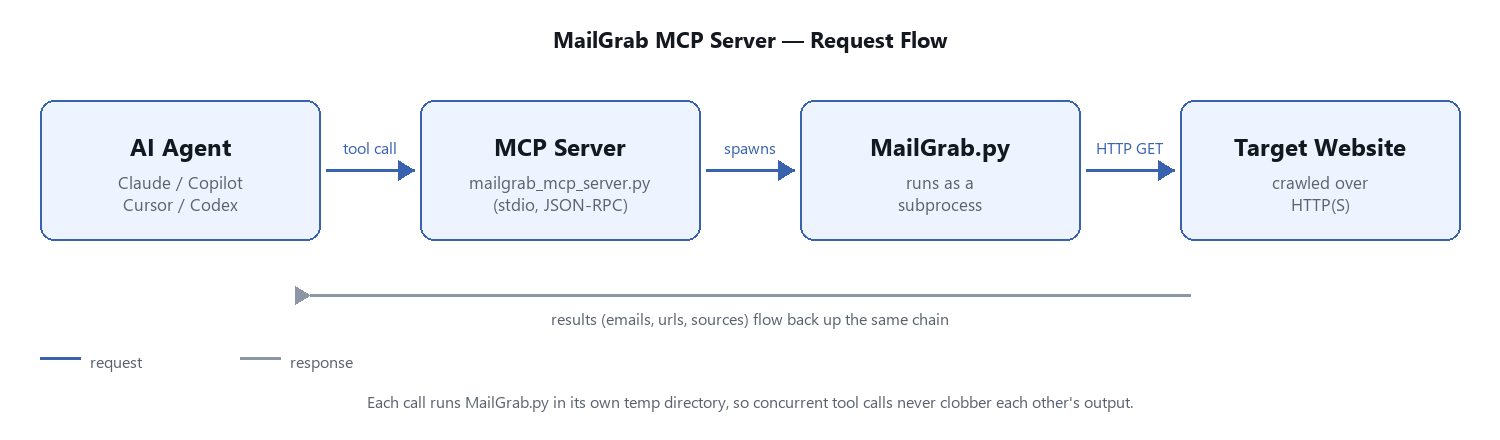
MailGrab Also Ships An MCP (Model Context Protocol) Server (mailgrab_mcp_server.py), So AI Coding Agents Like Claude, GitHub Copilot, Cursor, Or Codex Can Call MailGrab As A Tool Instead Of You Shelling Out To It By Hand. Each Call Runs MailGrab.py As Its Own Subprocess In A Private Temp Directory, So Concurrent Tool Calls Never Corrupt The Agent’s Stdio Stream Or Clobber Each Other’s Output Files.
python mailgrab_mcp_server.py
See The GitHub Wiki’s “MCP Server” Page For How To Point Your Agent Of Choice At It.